
If you run a blog, you probably know how much energy goes into writing a single post. But what if you could take all that effort and spin one blog post into 20 fresh pieces of content? AI tools make this possible, and it’s honestly pretty handy for getting more eyes on your ideas without burning yourself out.
Keeping your content alive across platforms is a smart way to grow your brand, reach new people, and keep your existing audience involved. I’ll show you practical ways to do this with the latest AI tools. No fancy talk, just straightforward tips and tricks you can use even if you’re not a tech expert.
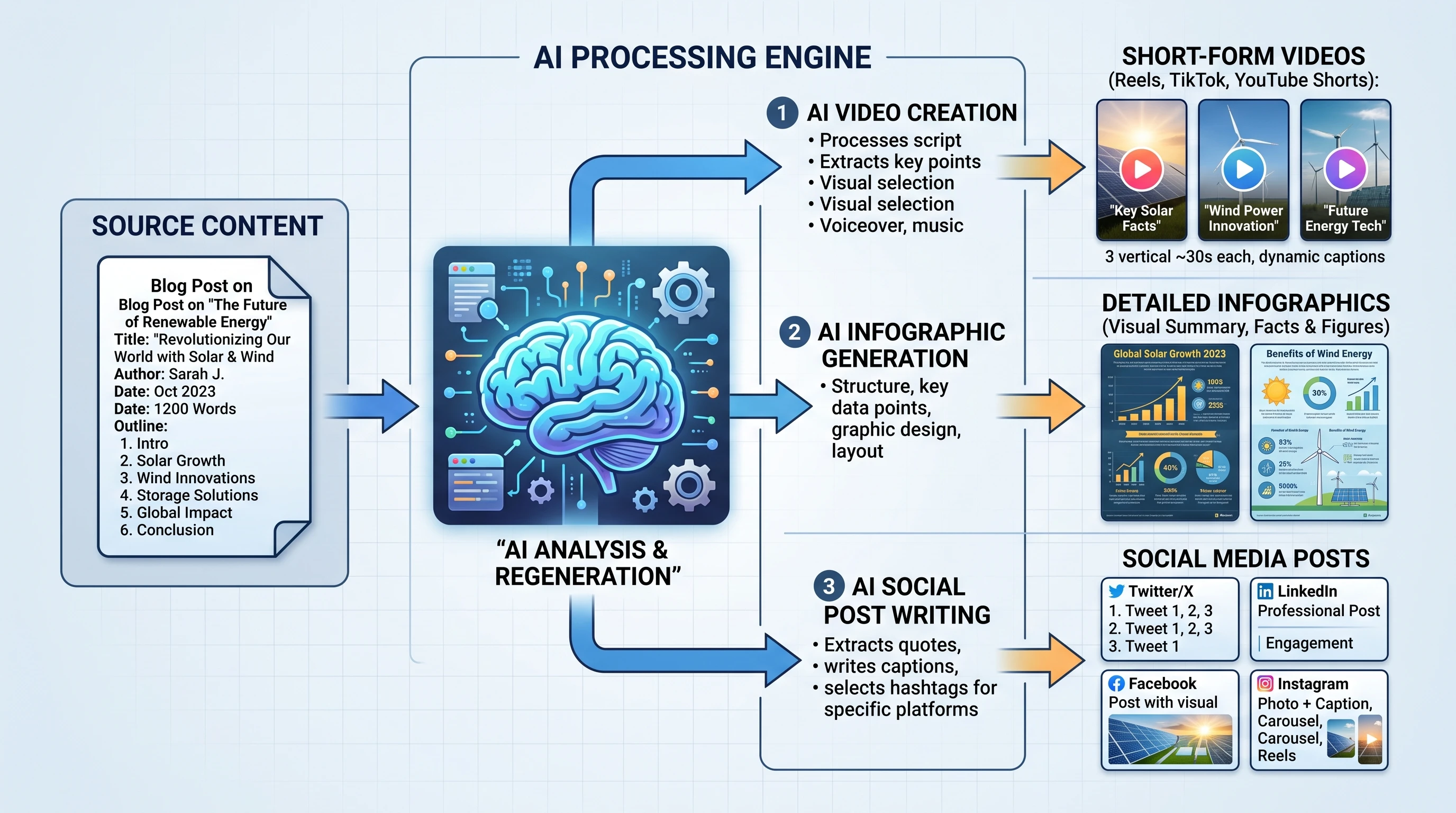
Why Repurposing Blog Content Matters
Writing a blog post can take hours. It would be a waste to let all that hard work sit in just one spot on your site. Repurposing means breaking your long-form article into different chunks and spreading them on platforms like Instagram, LinkedIn, YouTube, Facebook, and email lists.
By doing this, you stop your content from going stale and get it seen by people who hang out in different digital spaces. Short reels and carousels work better on Instagram; LinkedIn readers like thoughtful articles or quick tips. Your own subscribers really appreciate newsletters that pack value.
Repurposing isn’t just about saving time. It also helps with SEO since you’re creating more chances for your content to show up in search engines. AI gives a boost to this process by cutting down the time it takes to reformat, summarize, or spice up your main blog for these different platforms.
AI Tools That Make Repurposing Easy
Now that so many AI-powered tools exist, turning content from a single blog post into a bunch of new formats is easier than ever. You don’t need to manually rewrite everything or hire a whole team.
- ChatGPT and Google Gemini: Both are great for summarizing, paraphrasing, and generating new headlines or topics.
- Jasper and Copy.ai: Super helpful for crafting snappy social media posts from longer articles.
- Canva Magic Write: Good for creating quick graphics and slides by pulling in key points and visuals.
- Descript and Lumen5: Let you turn blog content into video scripts, short clips, or audio pieces in a few clicks.
- Repurpose.io: Automates the process of sending your content from one channel to another, saving you tons of manual steps.
All these tools come with easy-to-understand interfaces. You don’t need to be a tech wizard. Most have free versions or trials worth trying out before committing.
Step by Step: Turning One Blog Post Into 20 Pieces of Content
The exact number and type of pieces you can get from a blog post change based on your topic and audience. Still, 20 is pretty reasonable if you follow a smart process. Here’s how I break it down:
1. Blog Variations and Summaries
- Write 3 to 5 social media captions (Twitter, LinkedIn, Facebook) highlighting the main takeaways.
- Use AI to create a summary and a long summary.
- Make a LinkedIn article or original post with key insights.
2. Quote Cards and Shareables
- Track down powerful lines or tips, then use Canva or another AI image tool to make 2 or 3 quote graphics.
- Create infographics based on statistics or step-by-step instructions.
3. Audio and Video Content
- Convert your top three sections into scripts for video or audio. Generate a 60-second explainer video for TikTok or Reels.
- Record a podcast episode summarizing the post, with AI transcription creating show notes.
- Create an animated explainer or slideshow video using Lumen5 or Pictory.
4. Newsletters and Emails
- Turn the main post into a short newsletter tip and a longer deep-dive email. That’s two quick wins.
- Ask AI to come up with an email subject line split test (A/B) variant.
5. Downloadables and Resources
- Offer a downloadable checklist or worksheet based on your blog’s main action points.
- Create a resources list of tools, links, or products in your post and format it as a shareable resource PDF.
6. Interactive Content and Stories
- Make an Instagram or Facebook Story by pulling out your post’s first tip, then tease readers with a link.
- Build a poll or quiz using blog topic highlights (super easy with AI help).
If you add up each one, you get over 20 pieces. The trick is to think about how each piece connects to your audience’s habits across platforms.
Lean on AI tools to do all the heavy lifting when it comes to rephrasing, summarizing, and designing. If you want to push it further, consider collaborating with peers to cross-promote or guest post, expanding your reach even more.

Things to Keep In Mind for Repurposing Success
Repurposing works best when you set clear goals. Each platform has its own vibe and audience style. Here’s what I always check before spinning up new content:
- Audience Fit: LinkedIn, Instagram, and email are all different in what their users expect or respond to. Adjust your tone, formality, and content format.
- Platform Rules: Check video lengths, image sizes, and text limits for each place. AI tools help by outputting content in specific formats.
- SEO Value: When republishing to your own site, change at least 20 to 30 percent of the words to avoid getting dinged for duplicate content in search results.
- Brand Voice: AI is great, but sometimes it can sound robotic. Double-check for consistency with your personal style and messaging. A little manual tweak goes a long way.
With AI tools, it’s all about balance. I use these to jumpstart drafts, then spend a few minutes polishing to make sure everything feels authentic and valuable. And whenever possible, ask your audience for feedback—that insight can help shape what you repurpose next!
How to Optimize AI-Generated Content for Each Platform
Making small tweaks helps improve how your repurposed pieces perform. Different channels need different approaches:
- Instagram: Make image posts colorful and to the point. Add a question at the end to spark involvement.
- LinkedIn: Share stories and experiences to connect. Break up text into short paragraphs and use simple headers.
- Twitter/X: Use direct language. Short, punchy sentences work best here.
- Email: Focus on getting attention in the subject line. Include only one or two calls to action per email for clarity.
- YouTube/TikTok: Create video scripts by summarizing each blog section. Put the main tip upfront to catch those short attention spans.
Try out variations for each platform. Sometimes, what flops on one site can pop off on another. Mixing and matching gives you clues for future content tweaks.
Advanced Tricks for Next-Level Repurposing
Once you nail the basics, you can explore AI for even more advanced content expansion:
- Cluster Content: Use your original post to build clusters. For example, break down your blog into a series of niche microarticles for newsletter sequences or LinkedIn posts.
- Data Insights: Use AI to find the most shared topics in your niche, then relate your repurposed pieces to those high-traffic ideas.
- Content Customization: Feed samples of your writing into AI platforms so they learn your voice. Tools like Jasper let you build custom templates or “recipes” that match your style every time.
- Republishing Workflows: Set up automation with Zapier or Make.com to deliver new content snippets directly to your CMS, social platforms, or newsletter tool.
Over time, you’ll start to spot which formats and channels give you the best feedback or involvement. Double down on those and don’t be afraid to keep tweaking. AI gets better the more you use it, and pairing it with analytics lets you track improvements over time.
Frequently Asked Questions
Here are some questions I get pretty often about this process:
How long does it take to repurpose a blog post into 20 pieces with AI?
AI speeds things up a lot. If you have clear templates, you can easily finish in less than two hours. I use ChatGPT for this task. Manual tweaks and edits add a bit, but nowhere near the time it would take doing everything from scratch.
Can I use free AI tools or do I have to pay?
Many tools offer free plans. For heavier use or more features, some paid options are worth the investment. Start with free versions and move up as your needs grow.
Will Google penalize my content if I use AI?
If you’re just copying and pasting AI output as is, it might hurt SEO. Instead, add your personality, examples, or a custom intro. This keeps content fresh and helps build trust with readers and search engines.
Is it possible to automate the whole thing?
You can automate about 80 percent using tools like Repurpose.io, Zapier, or Buffer. Final reviews and edits are where the personal touch comes in. Set up workflows to save the most time.
A Final Word On Making the Most of Your Blog Content
Transforming your best blog posts into a content machine isn’t just about working harder. With today’s AI tools, you can be smarter with your workflow, hit more platforms, and spend less time redoing the same old thing. From social shares to short videos and downloadable freebies, your single blog post goes a lot further.
Try out a few tools, see which content pieces your audience loves most, then keep iterating. The internet moves fast, and having a content repurposing system in your back pocket is super important for staying visible and fresh.
Don’t be afraid to try new platforms—sometimes, your repurposed content can surprise you and capture a whole new group of readers or viewers.

_______________________________________________________
Want to chat more about content repurposing, AI productivity, or anything else related to growing your online presence? Check out more articles on this site or drop a comment below. Always happy to help fellow creators maximize their content and get results.
For more super detailed guides and AI tool walkthroughs, browse my other resources or subscribe to my newsletter; you’ll get even more tips to supercharge your content without all the burnout.
Ready to get started? Grab your favorite AI tool and turn your next blog post into a full-blown content engine!
MAKE MORE FROM EVERY PIECE OF CONTENT. IT’S EASIER THAN YOU THINK!